Fart Together multiplayer: Co-op Guide for Friends
Explore Fart Together multiplayer, including 2–4 player online co-op, raft mechanics, teamwork tips, PC requirements, and Early Access details.
One badly timed blast can turn your entire team’s raft into a group project gone wrong. Fart Together multiplayer puts two to four players in charge of one physics-driven raft, making communication just as important as steering. If you’re planning a game night, understanding Fart Together multiplayer will help you check compatibility, set expectations, and prepare for its unusual brand of cooperative chaos.
As of October 23, 2026, the Steam release is scheduled for October 29, with a demo listed separately. This guide covers the announced features and practical teamwork suggestions—not a hands-on review or a claim that every launch detail is already confirmed.
Fart Together Multiplayer: Player Count and Core Features
Developed and published by GamesMrkt, Fart Together is an online cooperative obstacle-course game. Rather than giving everyone an independent vehicle, it places the group aboard a shared raft powered by each player’s directional gas.
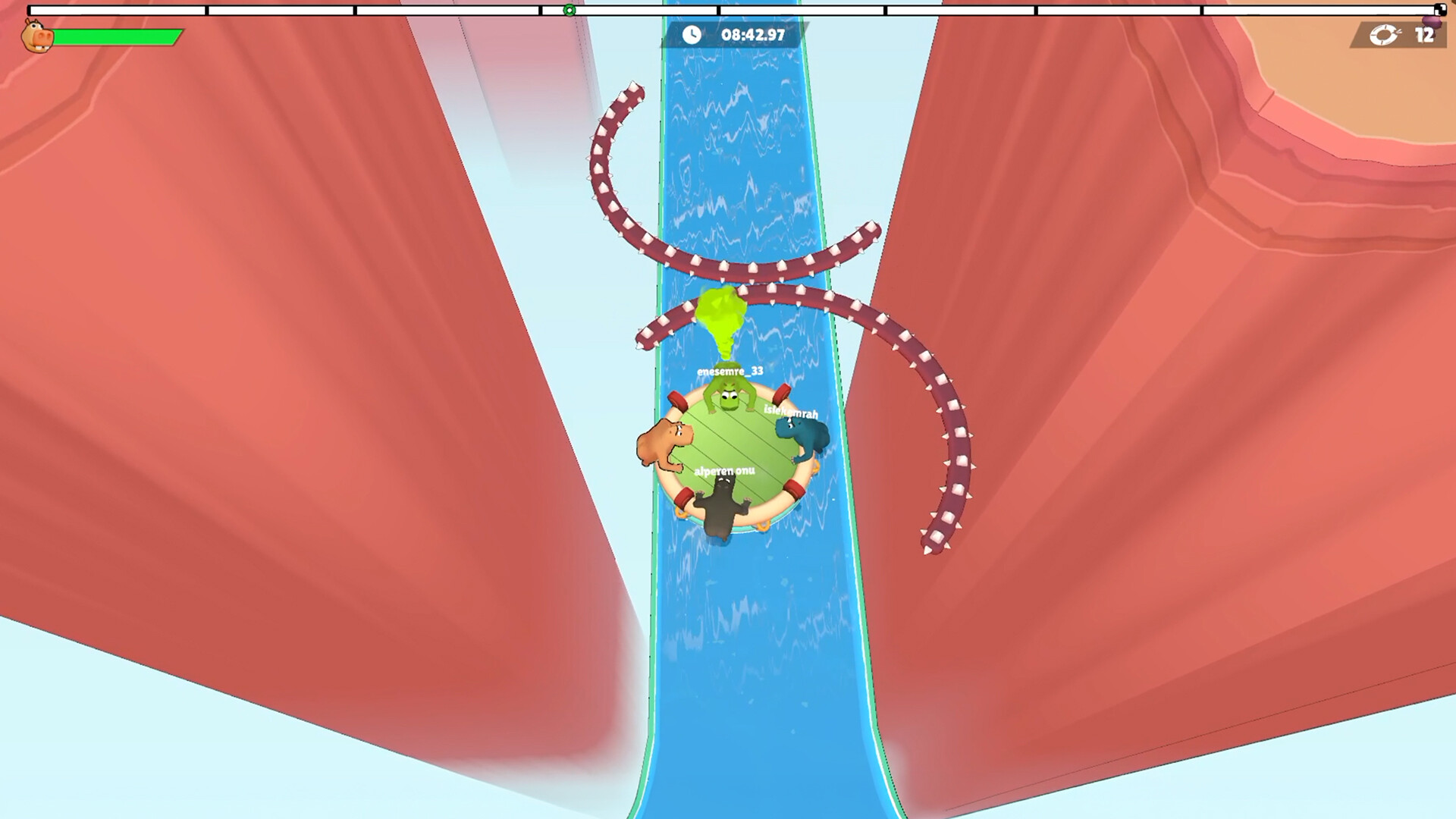
Official screenshot · Source: Steam store
That shared control is the central challenge. Your movement does not affect only your character; it contributes to what happens to everyone aboard.
| Feature | Confirmed information |
|---|---|
| Player count | 2–4 players |
| Listed multiplayer mode | Online co-op |
| Main objective | Navigate physics-based obstacle courses together |
| Shared vehicle | One raft controlled through players’ combined actions |
| Steam release target | October 29, 2026 |
| Release approach | Planned Early Access launch |
| Developer and publisher | GamesMrkt |
| Demo | A download option is listed on Steam |
The official Fart Together Steam listing is the primary source for these details. Check it before organizing a session, since release dates, requirements, and supported features can change.
Is it online or couch co-op?
Online co-op is confirmed; local co-op and split-screen are not confirmed in the supplied listing. Don’t assume that gathering four controllers around one computer will work.
Likewise, the available information does not establish cross-platform play, public matchmaking, private-lobby settings, or the exact invitation process. A Microsoft Store listing exists, but its accessible content does not verify those features. Multiple storefront listings alone do not prove cross-play support.
For planning purposes, treat Fart Together multiplayer as an announced two-to-four-player online experience, then verify the connection options available in the demo or release build.
How Shared-Raft Gameplay Works
The raft responds to the force, direction, and timing of players’ actions. Success therefore depends on combining inputs rather than simply having everyone push as hard as possible.
The announced courses include tight passages, abrupt turns, moving obstacles, and hazards that can upset the raft’s balance. Some situations call for acceleration; others require slowing down or coordinating a maneuver at the same moment.
| Gameplay element | Why it matters | Suggested team response |
|---|---|---|
| Direction | Conflicting inputs can send the raft away from its intended route | Agree on the next movement before committing |
| Timing | An otherwise useful action can become disruptive when performed late | Use a short countdown for coordinated moves |
| Force | Stronger input is not automatically the right answer | Experiment with controlled adjustments |
| Narrow passages | Small alignment errors become more consequential | Approach carefully and prioritize positioning |
| Moving obstacles | A safe route may depend on when you enter it | Watch the obstacle’s movement before advancing |
These responses are preparation tips based on the described mechanics, not tested solutions for specific levels.
Why one shared raft changes the experience
In many multiplayer games, a confident player can advance while everyone else catches up. Here, the team travels together. One person’s correction can interfere with another person’s plan.
Imagine approaching a narrow opening while two teammates attempt different corrections. Both may be trying to help, but the combined result can be worse than either action alone. A quick agreement about direction is potentially more valuable than another burst of power.
That makes Fart Together multiplayer especially relevant to groups that enjoy coordination puzzles and recoverable chaos. The humor comes from the premise, but the underlying challenge is learning how several people can control one moving object.
Teamwork Tips for Your First Session
Because the game has not reached its scheduled Steam launch at the time of writing, the following recommendations are suggested strategies, not verified advanced techniques or community-tested shortcuts.
1. Agree on what “left” means
Before a difficult section, decide how your group will describe directions. Screen-relative directions and character-relative directions can mean different things.
The available listing does not explain every camera behavior, so adapt your vocabulary after seeing the game in action. A useful callout should leave as little room for interpretation as possible.
2. Let one person call the next maneuver
A temporary caller can reduce overlapping instructions. That player does not need to dictate every input; the goal is to establish one immediate objective.
For example: “Line up with the opening, then move on three.”
Rotate the role if someone else understands a section better. Clear communication matters more than keeping a permanent captain.
3. Practice timing before difficult obstacles
When you reach a forgiving section, use it to learn how simultaneous actions affect the raft. A countdown gives everyone the same reference point.
Try this simple rhythm:
- Describe the intended movement.
- Confirm that everyone understands.
- Count down once.
- Act together.
- Observe the result before making another correction.
This is a communication exercise, not a claim that the game includes a specific practice area.
4. Avoid a pileup of corrections
When the raft drifts, the instinctive response may be for everyone to intervene. Multiple uncoordinated corrections can create another problem.
Instead, call out the drift and agree on a response. You are trying to understand the raft’s behavior, not win an argument over who reacted fastest.
| Situation | Helpful callout | Communication trap |
|---|---|---|
| Approaching a turn | “Set up for the turn before we push.” | Shouting a direction at the last second |
| Entering a tight gap | “Align first, then move together.” | Mixing steering instructions with conflicting speed calls |
| Facing a moving hazard | “Watch its cycle before we go.” | Having several players announce different launch moments |
| Recovering from drift | “One correction, then reassess.” | Everyone correcting independently |
| Discussing a mistake | “Was that direction or timing?” | Blaming a teammate without identifying the cause |
5. Change one thing after a failed attempt
A useful debrief can take ten seconds. Ask whether the main issue was direction, timing, or force, then adjust that one variable.
If everyone changes their approach simultaneously, you may succeed without understanding why—or repeat the same mistake under different conditions.
6. Use a separate voice call if helpful
The supplied listing does not confirm built-in voice chat. If your group prefers spoken coordination, arrange a separate voice call rather than assuming an in-game option exists.
For Fart Together multiplayer, short callouts are likely to be more useful than constant narration. Make room for laughter, but keep important instructions brief enough to hear.
PC Requirements and Pre-Game Checks
The published requirements specify a 64-bit Windows system, DirectX 11, and a stable broadband connection for online co-op. Recommended hardware is a useful planning target, but it is not a guarantee of any particular frame rate.
| Component | Minimum | Recommended |
|---|---|---|
| Operating system | Windows 10, 64-bit | Windows 10/11, 64-bit |
| Processor | Intel Core i5-8400 or AMD Ryzen 3 1200 | Intel Core i5-10400 or AMD Ryzen 5 3600 |
| Memory | 8 GB RAM | 16 GB RAM |
| Graphics | NVIDIA GeForce GTX 1050 Ti or AMD Radeon RX 560 | NVIDIA GeForce GTX 1660 or AMD Radeon RX 590 |
| DirectX | Version 11 | Version 11 |
| Storage | 4 GB available | 4 GB available |
| Network | Broadband internet | Broadband internet |
| Sound | DirectX-compatible sound card | DirectX-compatible sound card |
Before inviting friends, compare every player’s computer with these requirements. One person’s unsupported setup can derail the evening before the raft moves.
Input and accessibility details
The Steam listing identifies a keyboard-only option and lists Xbox and PlayStation controllers. It also mentions custom volume controls, camera-comfort features, and gameplay without quick-time events.
Those details help with planning, but they do not establish that every controller model or connection method will behave identically. Test your preferred input device first.
Steam Deck compatibility is marked unknown, so do not treat handheld support as verified.
A practical pre-game checklist:
- Check available storage and system specifications.
- Install updates before the planned session.
- Test controls and adjust volume levels.
- Confirm how players will communicate.
- Verify the current party-joining process inside the game.
- If using the demo, check which multiplayer features it actually includes.
The demo listing does not, by itself, establish feature parity with the upcoming Early Access build.
Release Date, Pricing, and Early Access Expectations
Fart Together multiplayer is scheduled to arrive on Steam on October 29, 2026. As of October 23, the full game is still listed as unavailable, while a demo download option appears on the store page.
GamesMrkt estimates approximately two to three months in Early Access. That is a development estimate, not a guaranteed full-release deadline.
| Topic | Developer’s stated position | What players should remember |
|---|---|---|
| Early Access duration | Approximately 2–3 months | Timing may change |
| Additional content | More courses, obstacles, modes, characters, and customization are planned | These are future plans, not confirmed launch inclusions |
| Refinement | Physics, controls, difficulty, performance, and polish are development priorities | The initial release remains a work in progress |
| Feedback | Steam discussions, Discord, and surveys are planned feedback channels | Specific reports can help identify problems |
| Pricing | Lower Early Access pricing and a later increase are planned | Verify the actual offer before purchasing |
Is Fart Together free?
The supplied Steam page includes a Free To Play genre label, but its Early Access answers also discuss a lower initial price and a higher full-release price. Those statements do not provide a clear, consistent pricing answer.
The Microsoft Store page title references a free download, but the accessible page content does not clarify its terms either. Check the current storefront offer instead of assuming that the full game is free everywhere.
There are also no Steam user reviews in the collected material. Claims about connection quality, replay value, or launch stability would therefore be premature. The premise may suit your group, but a wishlist or demo check is more informed than treating prerelease descriptions as proven performance.
FAQ: Fart Together Multiplayer
How many people can play Fart Together multiplayer?
The announced player count is two to four players in online co-op. Everyone works together to steer a shared raft through physics-based obstacle courses. Solo support is not confirmed in the supplied description.
Does Fart Together support split-screen or cross-play?
Neither feature is confirmed in the available reference material. Steam lists online co-op, but that does not establish couch co-op, split-screen, or connectivity between different storefront versions. Verify those details before your group commits.
Can you play Fart Together before October 29, 2026?
As of October 23, Steam lists a downloadable demo, while the full game is scheduled for October 29, 2026. The supplied description does not specify the demo’s complete content or multiplayer limitations, so check its details before planning a group session.
What is the best way to prepare for a first session?
Check everyone’s PC requirements, test input devices, and establish a communication method. Once playing, agree on directional language and use brief countdowns for coordinated actions. The central idea is simple: learn how your inputs combine before trying to solve every obstacle with more power.
Related Guides
Fart Together 2P: Two-Player Co-op Guide and Tips
Explore Fart Together 2P, including two-player support, online co-op details, teamwork tips, PC requirements, and the planned Early Access release.
Fart Together lobby invite: Co-op Setup and Help
Plan your Fart Together lobby invite with confirmed co-op details, release information, a setup checklist, and practical connection troubleshooting.
Fart Together online co-op: Multiplayer Guide
Explore Fart Together online co-op, including 2–4-player teamwork, release details, PC requirements, and practical tips for steering your shared raft.
Fart Together first time: A Couple's Comfort Guide
Nervous about farting in front of your partner? Learn how to handle the first time, talk about boundaries, and keep an awkward moment comfortable.
Fart Together demo gameplay: Co-op Tips and Guide
Explore Fart Together demo gameplay, 2–4-player raft controls, teamwork tips, PC requirements, and how to download the free Steam demo.