Fart Together demo: Download, Specs, and Co-op Tips
Try the free Fart Together demo on Steam. Learn how to download it, check PC requirements, and steer your crew through chaotic co-op courses.
One Raft, Four Players, and Plenty of Bad Decisions
The Fart Together demo turns a ridiculous idea into a real teamwork problem: steer one shared raft using fart power without sending everyone off course. It matters because your group’s timing—not just individual skill—determines whether you clear the next obstacle or create another spectacular failure. The free Fart Together demo lets you test that chemistry before deciding whether the full game belongs on your co-op game-night schedule.
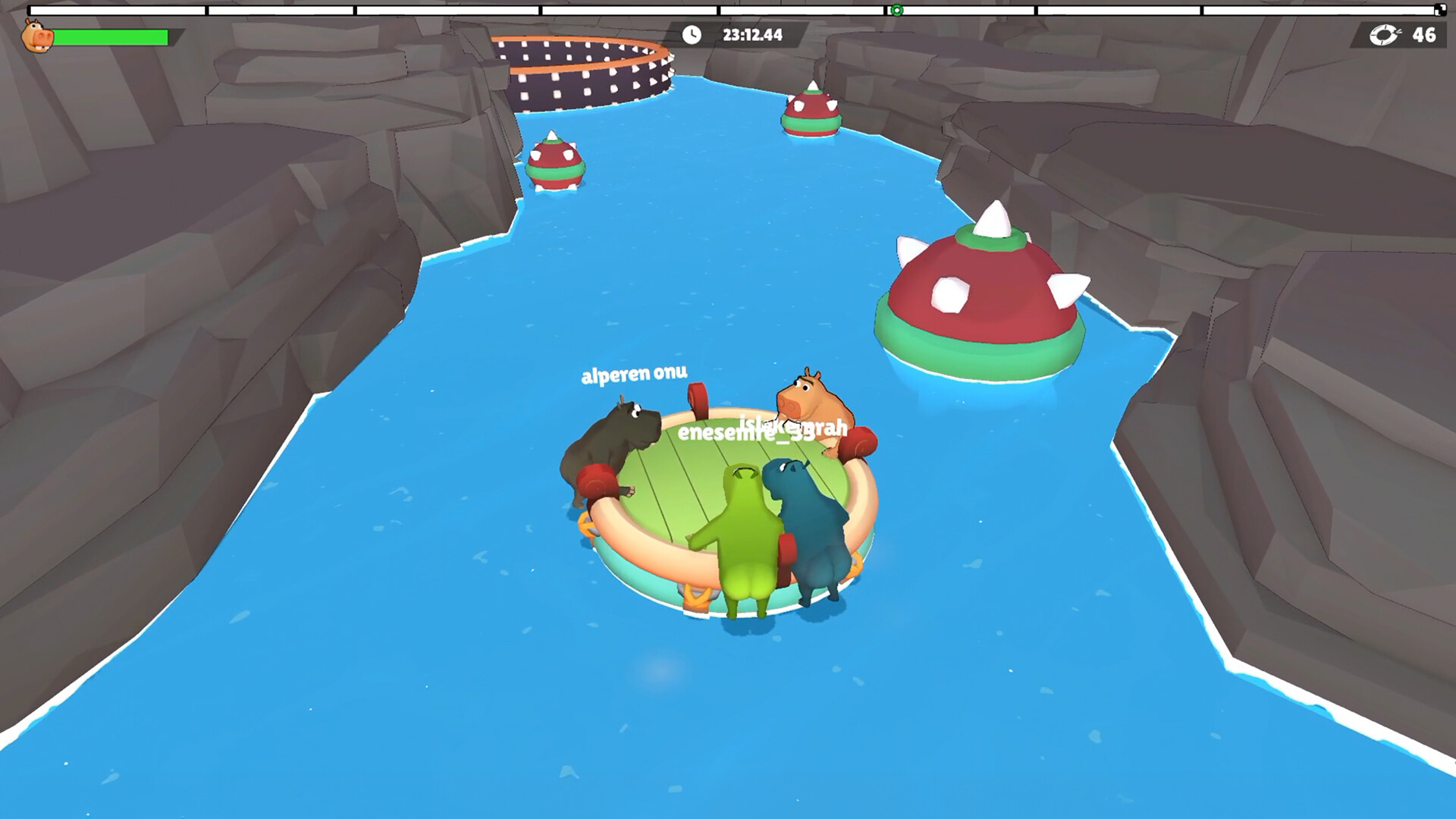
Official screenshot · Source: Steam store
Developed and published by GamesMrkt, this physics-based multiplayer game supports two to four players. Beneath the bathroom humor is a coordination challenge built around directional force, speed control, narrow passages, and moving hazards.
This guide covers the download process, PC requirements, what the gameplay involves, and practical ways to spend less time arguing about whose fault it was.
Fart Together Demo Download and Release Details
The demo launched on October 8, 2026, and is available free through Steam. As of October 23, 2026, the full game is listed for release on October 29, 2026. That makes the demo a useful opportunity to try the shared-raft mechanics before launch.
Use the official Fart Together Demo Steam page for the download, current availability, and updated system information.
| Detail | What the official listing says |
|---|---|
| Developer and publisher | GamesMrkt |
| Demo release date | October 8, 2026 |
| Demo price | Free |
| Player count | 2–4 players |
| Listed multiplayer feature | Online co-op |
| Full-game release listing | October 29, 2026 |
| Interface languages | English plus 16 additional languages |
| Steam Deck compatibility | Unknown |
How to install the demo
Getting started follows the usual Steam installation process:
- Open the official demo store page.
- Sign in to your Steam account if prompted.
- Select Install Demo.
- Follow Steam’s prompts and choose an installation location.
- Launch the demo from your library when installation finishes.
Have your teammates install it before your planned session. The listing requires a stable internet connection for online co-op, so everyone should also check their connection before joining.
Do not assume local split-screen, solo play, or controller support. The supplied listing confirms online co-op and a keyboard-only option, but it does not establish those other features. Check the current store page and in-game menus if any of them are essential for your setup.
What the early review numbers tell you
The October 23 reference snapshot shows 432 user reviews, with 89% positive and an overall Very Positive rating. That is encouraging early feedback for the demo, but it is not a guarantee of performance or enjoyment.
Those figures apply specifically to the demo, not the unreleased full game. Review totals and percentages can also change, so treat them as a dated snapshot rather than permanent scores.
How the Shared-Raft Gameplay Works
The central idea is simple: everyone influences the same raft. Your force, direction, and timing combine with your teammates’ inputs, meaning a poorly timed correction can undo an otherwise clean approach.
The Fart Together demo is therefore less about moving your own character independently and more about managing a shared vehicle. You need to consider what the raft is already doing, what the next hazard demands, and whether another player is about to push in the opposite direction.
| Gameplay element | Why it matters | Useful team response |
|---|---|---|
| Shared raft | Every player’s input affects the group | Agree on a maneuver before committing |
| Directional force | Poorly aligned pushes can send you off course | Make small, deliberate corrections |
| Narrow passages | Extra speed leaves less room to adjust | Line up before entering |
| Sharp turns | Late reactions can spoil the approach | Call the turn early |
| Moving obstacles | Timing matters as much as direction | Watch their movement before advancing |
| Unbalancing hazards | A successful approach can still go wrong | Leave room to recover |
The official description emphasizes that stronger propulsion is not automatically better. Sometimes the team needs speed; other times, restraint and simultaneous inputs are more important.
What player experience adds
In DontbeaNPC’s recorded playthrough, player experience highlights repeated attempts, checkpoints, trouble slowing down, and sections the players describe as having currents. Their communication shifts between directional calls, countdowns, and requests to hold back.
That example illustrates the game’s likely appeal: a messy attempt can become funny enough to make another try worthwhile. It also shows why constant shouting is not necessarily effective communication.
However, one playthrough cannot establish an average completion time, every available mechanic, or how difficult all groups will find the demo. The useful takeaway is narrower: the players improve by coordinating their movements and adjusting their pace.
The same player experience includes reaching a finish after multiple checkpoint sections. That supports expecting a course with recoverable progress in the demonstrated session, not a confirmed level count or fixed demo length.
Co-op Tips for Getting Through the Course
The best starting strategy for the Fart Together demo is to reduce conflicting decisions. Four people trying to fix the same mistake at once can create a bigger problem than the original drift.
The following tips are practical recommendations based on the official mechanics and the recorded player experience—not developer-prescribed solutions.
Choose one caller for each attempt
Let one person announce the immediate plan. Everyone can contribute observations, but a single caller helps prevent simultaneous, contradictory instructions.
Keep commands short and specific:
- “Line up” before entering a narrow section.
- “Small correction” when only a slight adjustment is needed.
- “Wait” before committing to a moving hazard.
- “Three, two, one” when timing inputs together.
- “Reset the plan” after a failed approach.
Also settle what “left” and “right” mean to your group. If players interpret directions differently, a quick clarification before the attempt is more useful than an argument afterward.
Use the opening attempts to learn the raft
Do not make your first objective maximum speed. Learn how the raft responds when one player acts, when teammates combine force, and when someone tries to correct an existing movement.
A short learning routine gives the team a common reference point:
| Practice step | What to try | What to learn |
|---|---|---|
| 1. Isolate input | Let one player make a brief input where safe | How that action affects direction |
| 2. Combine inputs | Coordinate a short, shared push | How quickly the raft gains movement |
| 3. Test correction | Adjust a small amount of drift | How early you need to react |
| 4. Approach a gap | Align before moving through | Whether your entry speed is manageable |
| 5. Repeat deliberately | Change one part of a failed approach | Which adjustment actually helps |
Check the in-game control instructions before doing this. The reference material does not provide a complete, reliable keybinding list, so guessing exact buttons would be unhelpful.
Line up first, then commit
A narrow passage becomes harder when you enter diagonally and try to repair the approach halfway through. When the course allows it, establish your alignment before applying the force needed to move through.
Likewise, watch a moving obstacle long enough to understand its motion. Waiting for a better opening can be more effective than trying to rescue a rushed entry.
This does not mean every section should be slow. The official description explicitly includes moments requiring acceleration. The goal is intentional speed, rather than continuous propulsion.
Treat checkpoints as learning opportunities
Checkpoints appear in the recorded player experience. After reaching one, use subsequent attempts to solve the next section instead of changing everything at once.
If you miss a turn, ask one concrete question: Was the approach too fast, was the raft misaligned, or did the correction arrive late?
Choose one change for the next attempt. That makes failures informative and reduces the temptation to blame whichever friend happens to be laughing the loudest.
PC Requirements and Whether It Fits Your Group
Before downloading the Fart Together demo, compare your system with the published requirements. The listed storage requirement is 4 GB of available space, though that should not be mistaken for an exact download size.
| Component | Minimum | Recommended |
|---|---|---|
| Operating system | Windows 10, 64-bit | Windows 10/11, 64-bit |
| Processor | Intel Core i5-8400 or AMD Ryzen 3 1200 | Intel Core i5-10400 or AMD Ryzen 5 3600 |
| Memory | 8 GB RAM | 16 GB RAM |
| Graphics | NVIDIA GTX 1050 Ti or AMD Radeon RX 560 | NVIDIA GTX 1660 or AMD Radeon RX 590 |
| DirectX | Version 11 | Not separately specified |
| Storage | 4 GB available | 4 GB available |
| Network | Broadband internet | Broadband internet |
| Sound | DirectX-compatible sound card | DirectX-compatible sound card |
These specifications do not establish a particular frame rate or resolution. Meeting the minimum requirements is a starting point, not proof of identical performance across every PC.
The store also lists custom volume controls, stereo sound, camera-comfort features, a keyboard-only option, and gameplay without quick-time events. Interface support spans 17 languages, including English, Spanish, Dutch, Japanese, and Korean.
Who should try it?
The Fart Together demo makes the most sense for friends who enjoy shared responsibility and can laugh at failed attempts.
| Your group’s preference | Likely fit |
|---|---|
| Chaotic cooperative games and silly humor | Strong reason to try the free demo |
| Practicing a tricky section together | Well aligned with the coordination challenge |
| Independent movement and personal control | Shared steering may feel restrictive |
| A confirmed couch co-op setup | Verify support before planning around it |
| Verified Steam Deck compatibility | Compatibility remains unknown in the supplied listing |
The strongest reason to download is not the early review score or the novelty alone. It is the chance to find out whether your group enjoys this particular kind of teamwork.
If coordinating a clean turn feels rewarding even after several ridiculous failures, the premise is probably working for you. If shared control only creates frustration, the free trial has still helped you make an informed decision.
FAQ: Fart Together Demo
Is the Fart Together demo free?
Yes. Steam lists it as a free demo. You can install it through the official demo page without purchasing the full game.
How many players can play together?
The official description specifies two to four players, and the store lists online co-op. The supplied material does not confirm solo play or local split-screen, so check current features before planning either.
How long does the demo take to finish?
The supplied sources do not establish a reliable completion time. Recorded player experience shows retries, checkpoints, and a finish, but your session length will depend on coordination and how quickly your group learns each section.
When does the full game release?
As of October 23, 2026, the Steam listing gives the full game a release date of October 29, 2026. Check the current listing for changes, and use the demo to decide whether your crew wants another trip on the raft.
Related Guides
Fart Together demo gameplay: Co-op Tips and Guide
Explore Fart Together demo gameplay, 2–4-player raft controls, teamwork tips, PC requirements, and how to download the free Steam demo.
Fart Together demo trailer: Co-op Gameplay and PC Guide
Watch the Fart Together demo trailer, learn how its 2–4-player raft co-op works, and check Steam download details, PC specs, and release timing.
Fart Together raft Guide: Steering and Co-op Tips
Master the Fart Together raft with practical steering, timing, obstacle, and co-op tips. Learn what differs between the Steam and mobile listings.
Fart Together 2P: Two-Player Co-op Guide and Tips
Explore Fart Together 2P, including two-player support, online co-op details, teamwork tips, PC requirements, and the planned Early Access release.
Fart Together steam: Demo, Release Date & PC Guide
Get Fart Together Steam details on the free demo, October 29 Early Access launch, co-op, PC requirements, and Steam Deck compatibility.